
Piano ORG : Play Real Keyboard
VNGAME LIMITEDMusic
3.851.00 Reviews
- Version
- 16.0.0
- Installs
- 1.00M
- Age Rating
- Everyone
Screenshots
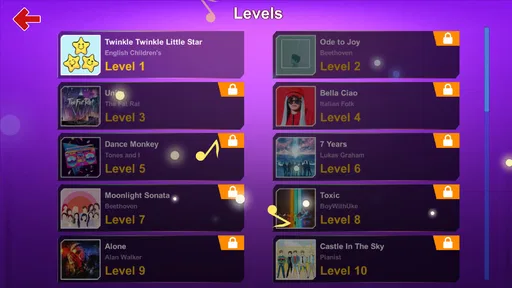
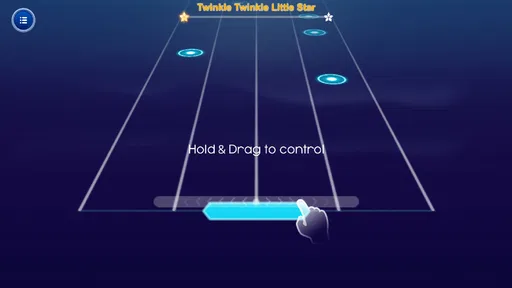
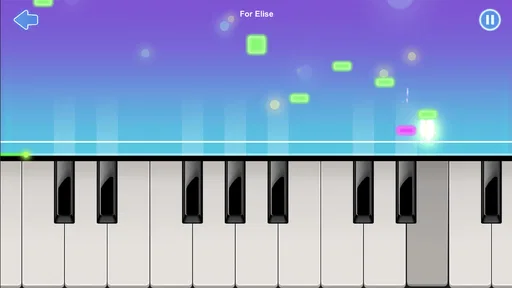
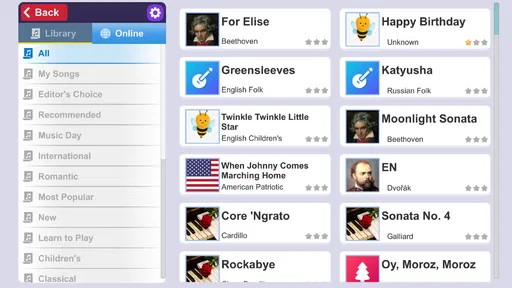
Our Review of Piano ORG : Play Real Keyboard
 Analysis by Appyee
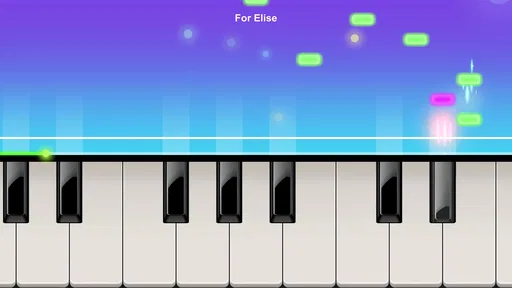
I approached Piano ORG: Play Real Keyboard as a quick music game rather than a replacement for a full digital piano. That distinction matters. Its appeal is immediate: open it, place a finger on the on-screen keyboard, and start experimenting. For a casual player, a beginner who wants a pocket practice tool, or someone who enjoys making short melodies without carrying an instrument, that simplicity is the main attraction.
The game sits in the music category and comes from VNGAME LIMITED. It is free to install, suitable for Everyone, and supports devices running Android 7.0 or later. The current release is 16.0.0, while the app itself first appeared on December 24, 2022. With more than a million installs and a 3.8 average from roughly 4.8 thousand ratings, it clearly attracts a substantial audience, although the score also suggests that the experience will not suit every phone or every type of musician.
Getting past the first points of friction
The first obstacle is not musical ability; it is deciding what you want from the app. If you expect a structured piano course, detailed notation, or the realistic response of a physical keyboard, this is probably the wrong starting point. If you want a compact way to tap out a tune, test a melody, or pass a few minutes with musical sounds, the concept makes much more sense.
On a phone, the keyboard is naturally limited by screen width. Playing a simple melody with one finger feels manageable, but chords and quick passages can become awkward because several keys compete for the same small area. A tablet is likely to feel more comfortable for anything beyond casual tapping, while a phone works best for short ideas and relaxed play. I would not judge the app harshly for this limitation; it is a consequence of turning a piano layout into a touch-screen game.
Another common source of disappointment is touch accuracy. A real key gives your hand physical spacing and feedback. A glass screen does not. When I miss a note, the problem may be the narrow target, a finger covering nearby keys, or the device reacting slowly under load rather than a flaw in the musical idea itself. I found it helpful to play slowly at first and keep the phone steady instead of trying to perform immediately.
The most useful mindset is to treat the screen as a sketchpad for music, not as a full instrument. That expectation makes the short sessions more enjoyable and makes the app easier to recommend to beginners.
What to check before blaming the game
Before trying to play seriously, I would check the basic environment. Make sure the device is running Android 7.0 or newer, close demanding apps that may compete for attention, and keep the screen clean. A small amount of moisture or dirt can make taps feel inconsistent, especially during repeated notes. These are simple steps, but they matter more on a touch keyboard than on many other casual games.
It is also worth testing the app with the phone held in the position that feels most natural before beginning a longer session. A changed grip can alter where your fingertips land, and a case with a raised edge may make the outer keys less comfortable to reach. I prefer to support the phone with one hand and play with the other for short passages. For two-handed experimentation, a flat surface is more reliable than holding the device in midair.
If the sound seems delayed, I would first reduce the workload on the device and test again. Avoid judging timing while several other apps are active. If the delay remains, the phone may simply be a poor match for precise live playing. That does not necessarily mean the keyboard is broken; touch response and audio timing depend on the hardware and the wider device environment.
Volume deserves a practical check too. A low speaker level can make notes seem weak, while excessive volume can make the sound tiring and encourage you to strike the screen harder than necessary. Headphones may change the listening experience, but they can also make timing feel different from the built-in speaker. I would choose one listening setup and keep it consistent while learning a short phrase.
A low-stress setup for first-time players
My preferred first session is deliberately modest. I open the keyboard, play individual notes from left to right, then return from right to left. After that, I choose a very short melody that I already know by ear. This approach reveals whether the keys respond comfortably without turning the first minute into a test of speed.
Beginners should resist the temptation to press harder when a note is missed. Touch keyboards do not reward force in the same way as acoustic keys. A lighter, more deliberate tap usually gives better control and reduces accidental contact with neighboring notes. I also recommend using one finger until the layout feels familiar, then adding a second finger for simple intervals.
For a child, the Everyone rating makes the app approachable from an age-classification perspective, but an adult may still need to help with device handling and expectations. The game can encourage curiosity, yet it should not be presented as a complete lesson system. A child who wants formal technique will eventually need an instructor, a proper keyboard, or a more structured learning tool.
The free price makes this initial experiment easy. However, in-app purchases are listed at $4.99 per item, so I would avoid spending until the free experience has answered a basic question: do you actually enjoy playing on this particular screen? A paid add-on cannot solve an uncomfortable device, poor timing, or a preference for physical keys.
Recovering when a session goes wrong
When a session goes wrong, I find it helps to separate a device problem from a playing problem before starting over. I’ll check whether sound and touch work elsewhere, then return to a slow, familiar phrase instead of forcing the whole melody. That reset keeps a small glitch from turning into a frustrating practice session and sets up a closer look at recovering the tune itself.
When the sound stops or the keyboard feels unresponsive
If the keyboard suddenly becomes silent, I would begin with the obvious checks: confirm that the device is not muted, raise the media volume, and test another sound outside the app. This separates a phone-wide audio problem from an issue limited to the game. If other apps are silent too, restarting the device is more sensible than repeatedly tapping the piano.
If only this game is affected, closing it completely and reopening it is a reasonable next step. I would also avoid switching rapidly between apps while playing, because returning from the background can leave a session feeling less responsive. When a restart restores normal behavior, I treat that as a temporary workflow problem rather than evidence that the keyboard itself is unreliable.
Touch problems need a slightly different approach. Try a slow sequence of separate taps in different parts of the keyboard. If the center responds but an edge does not, the grip, case, or screen protector may be influencing contact. If the entire display reacts poorly in other apps, the cause is probably outside Piano ORG. This kind of comparison is more useful than guessing from one missed note.
Recovering a melody without losing the idea
The best workflow recovery is not technical; it is musical. When a phrase falls apart, I return to the last few notes that felt comfortable and rebuild from there. Playing the whole passage repeatedly can reinforce the mistake. Short loops are less frustrating and make it easier to identify whether the difficulty comes from spacing, speed, or simply forgetting the next note.
I also recommend keeping a tiny mental map of the starting note and the direction of the melody. On a touch keyboard, looking away for even a moment can make the layout feel unfamiliar. For a tune you want to revisit, play the opening slowly several times before attempting the complete phrase. This gives you a reliable entry point after interruptions.
The app is particularly useful in this role as a portable idea catcher. If a melody occurs while you are waiting for a bus, relaxing on a sofa, or away from a piano, you can test its shape immediately. I would not depend on it as the only place to preserve a composition, though. A short tune that matters should also be written down, recorded elsewhere, or remembered through a simple note describing its starting point and rhythm.
Handling purchases with a clear purpose
Because the game is free but includes individual in-app items priced at $4.99, I would approach purchases as optional experiments rather than automatic upgrades. First spend time learning whether the basic keyboard is comfortable, whether the sound suits you, and whether you return to it after the novelty fades. If the answers are no, paying will not change the central limitation of playing on glass.
A purchase can make sense only when it addresses a specific need you already have and the available item clearly matches that need. I would read the purchase screen carefully before confirming anything, especially when the device is shared with a child. Keeping the decision deliberate helps maintain the app’s strongest quality: it is easy to try without committing to a traditional instrument.
When the app is not the cause
Not every unpleasant session points to a software fault. A crowded screen, tired hands, poor lighting, or an awkward sitting position can make the keyboard feel much harder than it is. I get better results when the phone rests on a stable surface and I play for a short period rather than gripping it tightly for a long session.
Audio equipment can also change your impression. Built-in speakers may make notes sound thin, while headphones can emphasize every small timing delay. If the experience feels wrong, compare one setup at a time instead of changing volume, grip, headphones, and playing speed together. That simple method helps identify the real source of the problem.
Device age is another factor. The minimum operating-system requirement is Android 7.0, but meeting that requirement does not guarantee the same responsiveness on every phone. Older hardware may handle ordinary apps comfortably yet struggle with fast touch-and-sound interaction. If the game works for slow melodies but not rapid passages, hardware performance may be the practical boundary.
This is where a different option becomes better. Someone learning scales, posture, finger independence, or accurate rhythm should consider a real keyboard or a dedicated teaching app. Someone who wants to create polished arrangements may prefer a digital audio workstation. Someone who only wants a casual musical toy may find this game more convenient than either alternative because it removes setup and equipment from the equation.
Who will enjoy this pocket keyboard
I think it suits curious beginners, casual players, and people who like turning spare moments into small musical experiments. It is also a reasonable choice for someone who wants to check whether a melody works before sitting at a larger instrument. The free entry point lowers the risk, and the Everyone rating keeps the concept broadly accessible.
It is less suitable for advanced pianists who need realistic key travel, nuanced dynamics, or dependable performance timing. It may also disappoint users who expect a complete song library, a formal lesson path, or a recording-centered production environment. Those are not minor differences; they define separate categories of musical tools.
For an everyday example, imagine remembering a melody during a lunch break. With this game, I can open the keyboard, find a starting note, and test whether the next few notes rise or fall as I remember them. If the phrase feels promising, I can later move to a proper instrument or write it down. That is a useful, specific job, and the app handles it more conveniently than carrying a keyboard.
The public response is mixed rather than universally enthusiastic: the game holds a 3.8 average across around 4.8 thousand ratings, with 51 written reviews shown alongside that feedback. I read that as a reason to keep expectations practical. Many people will enjoy immediate access to a playable keyboard, while others will notice the limits of touch control or want a deeper musical system.
My practical verdict after using it
Piano ORG: Play Real Keyboard works best when I use it for short, informal playing. Its value is not that it transforms a phone into a professional piano; its value is that it makes musical exploration available with almost no preparation. That is enough for testing a tune, entertaining a child, practicing note recognition, or filling a quiet few minutes.
The setup is straightforward, but good results depend on sensible habits: use a stable grip, test sound and touch before playing quickly, close competing apps when timing feels poor, and compare the game with another app before assuming the keyboard is at fault. These checks prevent many frustrating sessions and help reveal whether the device itself is the limiting factor.
I would recommend trying the free version to beginners and casual music fans, especially on a larger screen or a phone that responds well to touch. I would skip it if your main goal is serious piano technique, expressive performance, or full music production. In those cases, a physical keyboard or a specialized learning and recording tool will be a better investment of time.
For me, the final judgment is balanced: this is a convenient music game with a clear everyday use, but its simplicity is both its strength and its boundary. VNGAME LIMITED has made an accessible pocket keyboard, not a substitute for piano lessons or piano hardware. If you approach it as a quick musical companion, the free download is easy to justify; if you need realism and depth, look elsewhere before considering the optional $4.99 items.
Verdict
Strengths of Piano ORG : Play Real Keyboard
- Realistic piano sound with responsive touch controls
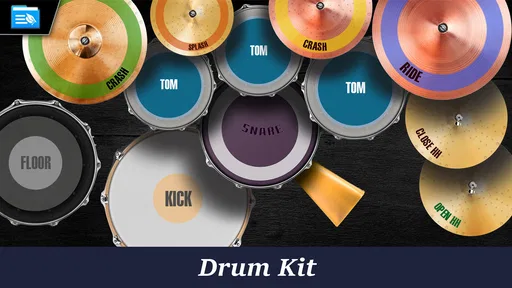
- Includes multiple instruments beyond the standard piano
- Useful for practicing scales, chords, and simple melodies
- Supports multitouch for playing chords naturally
- Quick to launch and convenient for casual practice anywhere
Limitations of Piano ORG : Play Real Keyboard
- Advanced features may require in-app purchases
- Small screens can make precise playing difficult
- Sound quality depends heavily on your device speakers
- Limited value for serious musicians without external accessories
- Ads may interrupt the experience in the free version
Similar Picks in This Category
View All
Tiles Hop Music & Ball Game
AMANOTES PTE. LTD.4.3

Magic Tiles 3™ - Piano Game
AMANOTES PTE. LTD.4.6

Real Piano
Bilkon3.7

Piano Game: Classic Music Song
Dream Tiles Piano Game Studio4.0

Smash Colors: Music Ball Rush
BADSNOWBALL HONGKONG LIMITED4.2

Piano Music Go-EDM Piano Games
Joy Journey Music Games4.5
Frequently Asked Questions
What is Piano ORG: Play Real Keyboard?
Piano ORG: Play Real Keyboard is a virtual piano app designed to let you play keyboard-style instruments on a mobile device. It typically provides an on-screen piano layout with touch controls, allowing you to practice melodies, experiment with chords, or simply play for entertainment. Before downloading, remember that the experience depends heavily on your phone or tablet’s screen size, audio quality, and touch responsiveness.
Can beginners use Piano ORG: Play Real Keyboard?
Yes, the app can be suitable for beginners because the keyboard is displayed directly on the screen and does not require previous piano experience. New players can start by tapping individual notes and gradually try chords or familiar melodies. However, it should be viewed as a convenient practice and entertainment tool rather than a complete replacement for formal lessons, a full-size keyboard, or professional music training.
Does Piano ORG: Play Real Keyboard work without an internet connection?
Basic piano playing may be available without a constant internet connection, depending on the installed version and the features being used. Offline access is useful when you want to practice while traveling or avoid using mobile data. Some additional sounds, advertisements, updates, or online-related functions may still require connectivity, so checking the app’s current store description and permissions is recommended before relying on it offline.
Is Piano ORG: Play Real Keyboard free to download and use?
The app may be available as a free download, but free versions can include advertisements, optional purchases, or limitations on certain sounds and features. The exact pricing model can vary between Android and iOS and may change with updates. Users should review the store listing carefully to understand whether premium content, ad removal, subscriptions, or other in-app purchases are offered.
Does the app provide realistic piano sound and useful controls?
Piano ORG: Play Real Keyboard is intended to simulate playing a keyboard through touch, but how realistic it feels depends on the device and the app’s available settings. Larger screens generally make chords and faster passages easier to play, while phone speakers may not reproduce rich piano tones accurately. Consider using headphones and checking the available instrument sounds, volume controls, and touch response before treating it as a serious practice instrument.
Play our best games!


